Backlog & SLA Dashboard
Review an operational backlog at a chosen reporting date and model a simple clearance scenario.
Sold individually. This product is not included in the existing toolkits or Ultimate Bundle.
What you can do with it
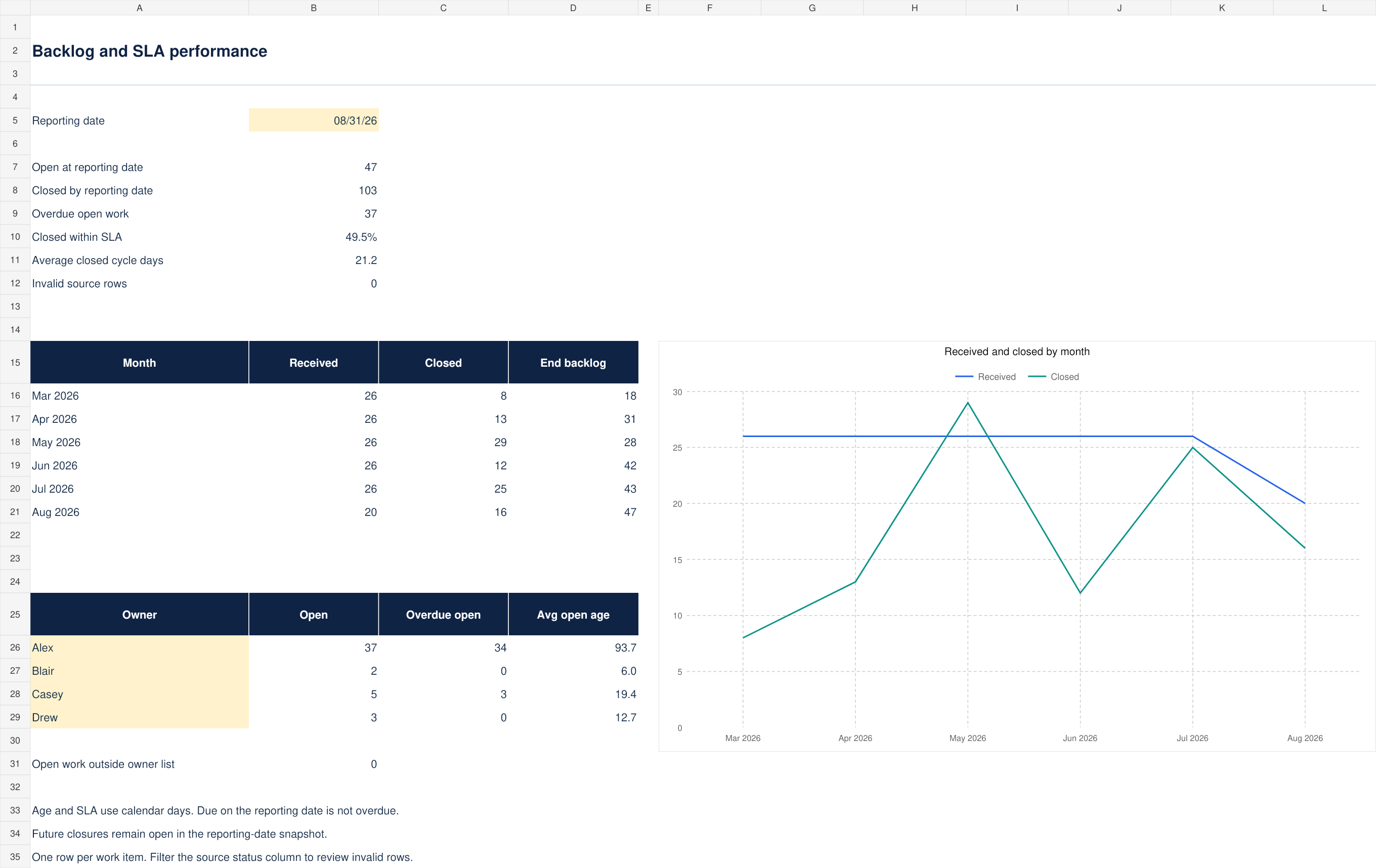
- Open, closed, overdue and SLA metrics at an editable cutoff
- Rolling six-month intake and closure chart
- Four owner summary slots with an unmapped-work check
- Twelve-week clearance scenario, blank file and 150-record example
What is included
Version 1.0 · one ZIP download · 72 KB
See every included filename (5 files)
Backlog-SLA-Dashboard-Blank.xlsxBacklog-SLA-Dashboard-Example.xlsxCONTENTS.txtLICENSE.txtSTART-HERE.md
How to use it
- Set Dashboard!B5 to the reporting date and replace the four owner labels.
- Enter one row per work lifecycle in Work items A9:F508: ID, received date, due date, closed date, owner and type. Leave closed date empty while work is open.
- Use real Excel dates. Agree the due-date policy with your stakeholders before loading work. This model uses supplied due dates and calendar days.
The included guide continues with definitions, review steps and product-specific limits.
Before you choose
Open means received by the cutoff and not closed by it. A closure after the cutoff remains open in the snapshot.
Overdue means an open item has a due date before the cutoff. Due today is not overdue. Age and closed cycle time are elapsed calendar days, with same-day activity equal to zero.
Format and scope
Designed for Excel. Blank and worked-example XLSX files, with no macros or external connections. Calculations and input scenarios were checked during authoring; native Microsoft Excel validation remains pending. Instructions are included as readable Markdown files.
500 prepared work lifecycles and four owner summary slots. Reopenings need a separate lifecycle ID.
No business-day or holiday calendar, intraday timestamps, automatic source refresh or Power BI report is included.