Insurance Claims Operations Dashboard
Monitor claim lifecycles, overdue work, claim-type mix and paid amounts through a chosen reporting cutoff.
Sold individually. This product is not included in the existing toolkits or Ultimate Bundle.
What you can do with it
- Operational snapshot, owner view and rolling monthly chart
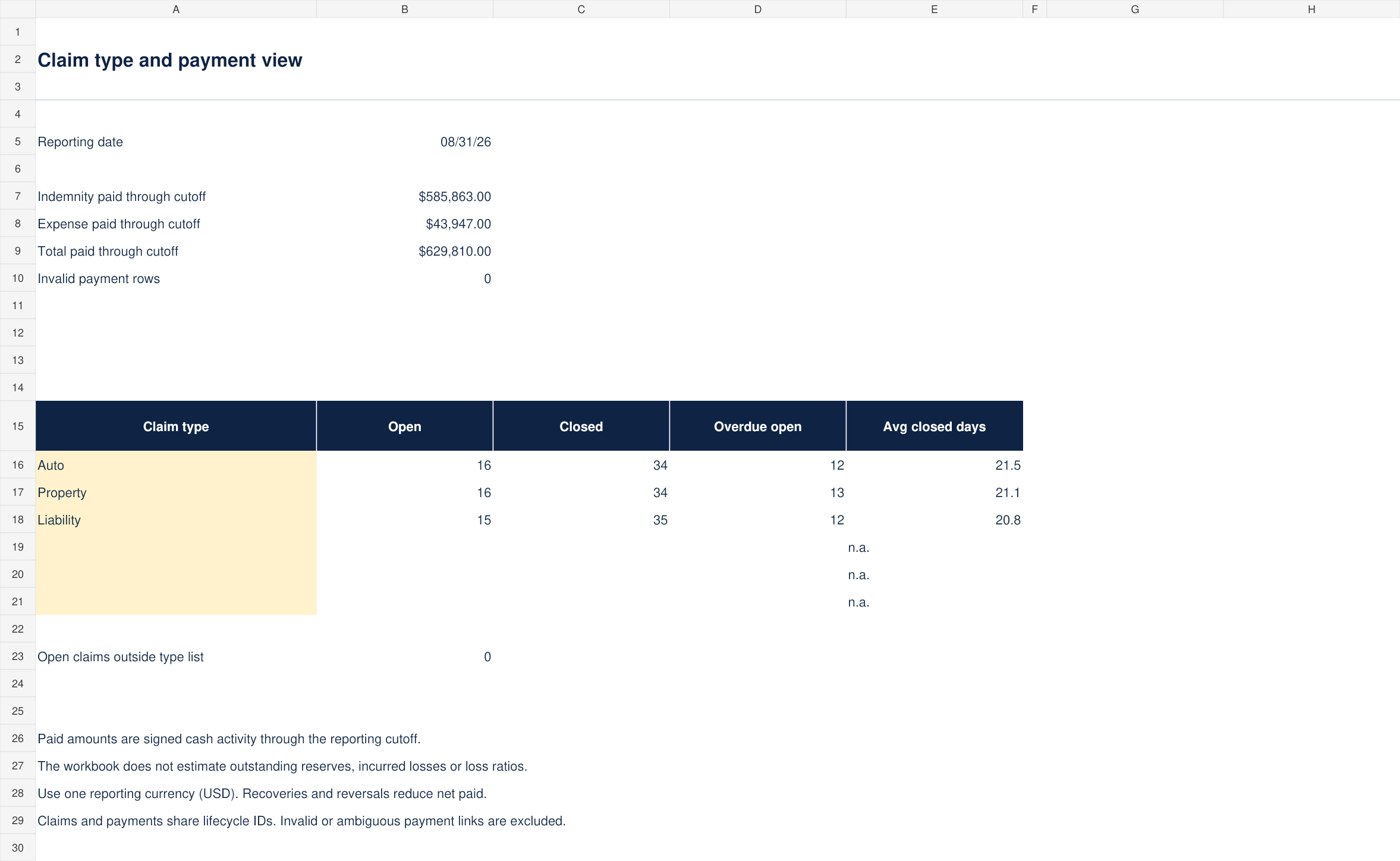
- Claim-type comparison with six editable slots
- Separate indemnity and expense payment register
- Blank file plus 150 fictional claims and 180 fictional payments
What is included
Version 1.0 · one ZIP download · 101 KB
See every included filename (5 files)
CONTENTS.txtClaims-Operations-Dashboard-Blank.xlsxClaims-Operations-Dashboard-Example.xlsxLICENSE.txtSTART-HERE.md
How to use it
- Set the reporting date on Dashboard. Replace the owner names and the claim-type labels on Claim mix.
- Enter one claim lifecycle in each Claims row, using a unique lifecycle ID, received date, agreed due date, closed date, owner and type.
- Enter one payment per row in Claim payments with its own unique payment ID, the matching lifecycle ID, payment date, indemnity amount and expense amount.
The included guide continues with definitions, review steps and product-specific limits.
Before you choose
Operational age, cycle time, SLA and reporting-cutoff rules follow the same calendar-day method as the Backlog & SLA Dashboard. This product adds claim-type and payment views; the two products share the operational snapshot structure.
The sample due date is 20 calendar days after receipt solely as a fictional example. Replace it with the agreed policy for your own workflow.
Format and scope
Designed for Excel. Blank and worked-example XLSX files, with no macros or external connections. Calculations and input scenarios were checked during authoring; native Microsoft Excel validation remains pending. Instructions are included as readable Markdown files.
500 claim lifecycles, 500 payment transactions, four owner slots and six claim-type slots.
No outstanding reserves, incurred-loss estimates, loss ratios, actuarial model or regulatory compliance assessment. The workbook is an operational reporting aid.
Excel format; no connected insurance system, PBIX file or Power BI license is included.